---
title: How do I schedule an appointment?
description: - Click on the first circle at the top labeled "New Appointment." - If you are on the appointment page, locate and click on the blue button that says "Schedule an appointment." - Choose the type of
---
[Skip to content](https://help.goldcare.com/how-do-i-schedule-an-appointment-1#main-content)
English
Show submenu for translations
![GoldCare Logo-Jan-22-2024-02-15-53-7887-PM.png\]](https://help.goldcare.com/hs-fs/hubfs/GoldCare%20Logo-Jan-22-2024-02-15-53-7887-PM.png?height=50&name=GoldCare%20Logo-Jan-22-2024-02-15-53-7887-PM.png)
Open main navigation
Close main navigation
- English
Show submenu for translations
- GoldCare Website
GoldCare Website
Hello. How can we help you?
- There are no suggestions because the search field is empty.
1. [Help Center](https://help.goldcare.com/?hsLang=en)
2. [Appointments](https://help.goldcare.com/appointments?hsLang=en)
# How do I schedule an appointment?
**- Click on the first circle at the top labeled "New Appointment."**
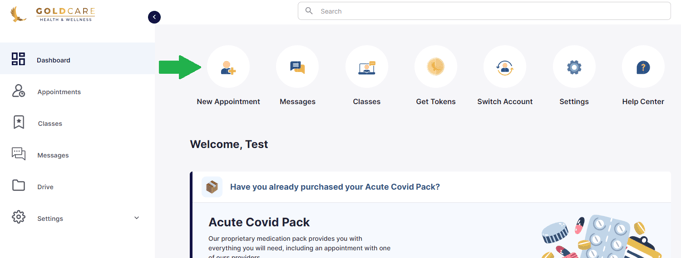
**- If you are on the appointment page, locate and click on the blue button that says "Schedule an appointment."**

**- Choose the type of service you require, such as primary care, nutrition, or holistic wellness.**
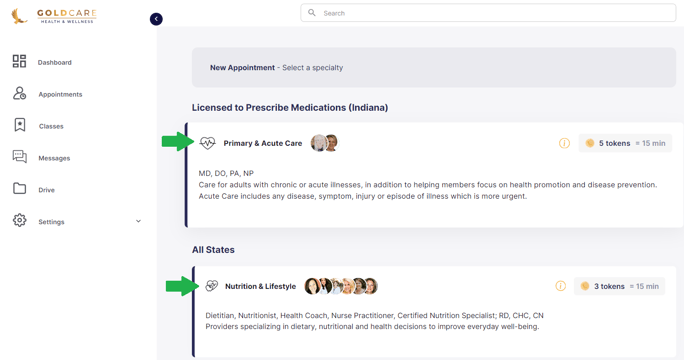
**- After selecting the service, a list of providers will be presented.**
**- Click on "Read More" to view a provider's bio.
- Once satisfied with your choice, click on "View Availability."**
**- If the provider allows, you can request a specific opening in their schedule by clicking "Request Availability."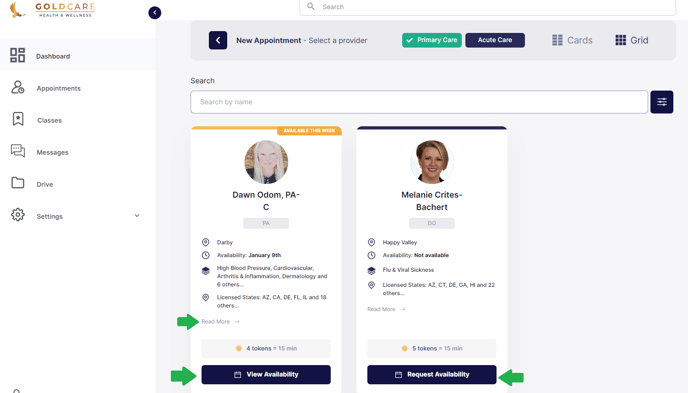**
**Pick Date and Time:**
- Select the preferred day and time for your appointment.
- Note: You have the flexibility to choose a longer appointment if needed.
- After selecting, click "Continue."

**Review and Confirm:**
- A page displaying all the details for your appointment will appear.
- Review the information carefully.
- Read and agree to the cancellation policy.
- Proceed to make the necessary payment to confirm your appointment.
- [Introduction to GoldCare](https://help.goldcare.com/introduction-to-goldcare?hsLang=en)
- [New Membership Sign-Up](https://help.goldcare.com/new-membership-sign-up?hsLang=en#main-content)
- [Verification Code](https://help.goldcare.com/new-membership-sign-up?hsLang=en#verification-code)
- [Logging into my account](https://help.goldcare.com/logging-into-my-account?hsLang=en)
- [Healthcare Services](https://help.goldcare.com/healthcare-services?hsLang=en#main-content)
- [Covid Pack](https://help.goldcare.com/healthcare-services?hsLang=en#covid-pack)
- [Appointments](https://help.goldcare.com/appointments?hsLang=en)
- [Classes](https://help.goldcare.com/classes?hsLang=en)
- [Tokens](https://help.goldcare.com/tokens?hsLang=en)
- [Intake Forms](https://help.goldcare.com/intake-forms?hsLang=en)
- [Pharmacy](https://help.goldcare.com/pharmacy?hsLang=en)
- [Settings](https://help.goldcare.com/settings?hsLang=en)
- [Messages](https://help.goldcare.com/messages?hsLang=en)
- [Family Members](https://help.goldcare.com/family-members?hsLang=en)
- [PMA agreement / Code of Conduct](https://help.goldcare.com/pma-agreement-code-of-conduct?hsLang=en)
- [Labs and Imaging](https://help.goldcare.com/labs-and-imaging?hsLang=en)
- [Cancellation & Refunds](https://help.goldcare.com/cancellation-refunds?hsLang=en)
- [GoldCare + Healthshare](https://help.goldcare.com/goldcare-healthshare?hsLang=en)
- [Contact Us](https://help.goldcare.com/contact-us?hsLang=en)
[.png?width=123&height=24&name=Layer_1%20(1).png "Chill listening crop-3")](https://www.goldcare.com/?hsLang=en)
Copyright © 2026, GoldCare